
Connect AI agents with the MCP server
Connect Claude Code, Cursor, Codex, or another MCP client to the Doxbrix MCP server, choose local or cloud mode, and use its tools, resources, and prompts.
The Doxbrix MCP server lets an AI coding agent read your documentation, learn the Doxbrix block catalog, validate drafts, and, when you allow it, edit and publish pages. This guide shows you how to connect an MCP client with a personal access token, choose between local and cloud mode, and verify that the agent can reach your projects.
The Model Context Protocol (MCP) is an open protocol that AI applications use to call external tools, read resources, and load reusable prompts. The Doxbrix MCP server exposes all three over HTTP, scoped to the user who owns the token.
How the server works
- Transport. The server uses the MCP Streamable HTTP transport at the path
/mcp. There is no stdio transport, so configure your client with a URL, not a command. - Authentication. Each client sends a Doxbrix personal access token as
Authorization: Bearer dxb_…on the firstinitializerequest. Every tool call then runs as that user and sees only that user's workspaces and projects. - Project binding. Add
?project=<slug>to the URL to bind a default project for the session, so tools can omit theprojectargument. - Mode. Add
?mode=localor?mode=cloudto choose which tools the agent gets. The default islocal. - Health.
GET /healthreturns{"ok": true, "name": "doxbrix-mcp", …}without authentication.
Local and cloud mode
| Mode | What the agent can do | When to use it |
|---|---|---|
local (default) | Read, search, validate, and score content. The agent writes .mdx files and docs.json locally with the dxb CLI, and you run dxb push yourself. | Most teams. No change reaches the live project until a person pushes it. |
cloud | Everything in local mode, plus tools that create, edit, restructure, and publish content directly in the cloud project. | Trusted automation that must edit the live project. |
Publishing is guarded twice in cloud mode. The server refuses publish_page unless the DOXBRIX_ALLOW_PUBLISH setting is on, and even then the page follows the project's approval rules: it is published only when the project requires no approval, and otherwise it is submitted for review.
Before you begin
- A Doxbrix account with access to at least one project.
- An MCP client that supports remote HTTP servers, such as Claude Code, Cursor, Codex, or Claude Desktop.
- For local mode, the
dxbCLI installed on the machine where the agent works. See Install the dxb CLI and sign in. - A personal access token with the scopes the agent needs:
| Scope | Needed for |
|---|---|
docs:read | Listing and reading pages, search, validation, quality scores, the block catalog |
project:read | Listing projects and reading settings |
docs:write | Cloud-mode page, space, and navigation changes, and publish_page |
project:admin | update_settings in cloud mode |
ai:use | ask_ai |
A token created without explicit scopes gets docs:read, docs:write, and project:read.
Connect an agent
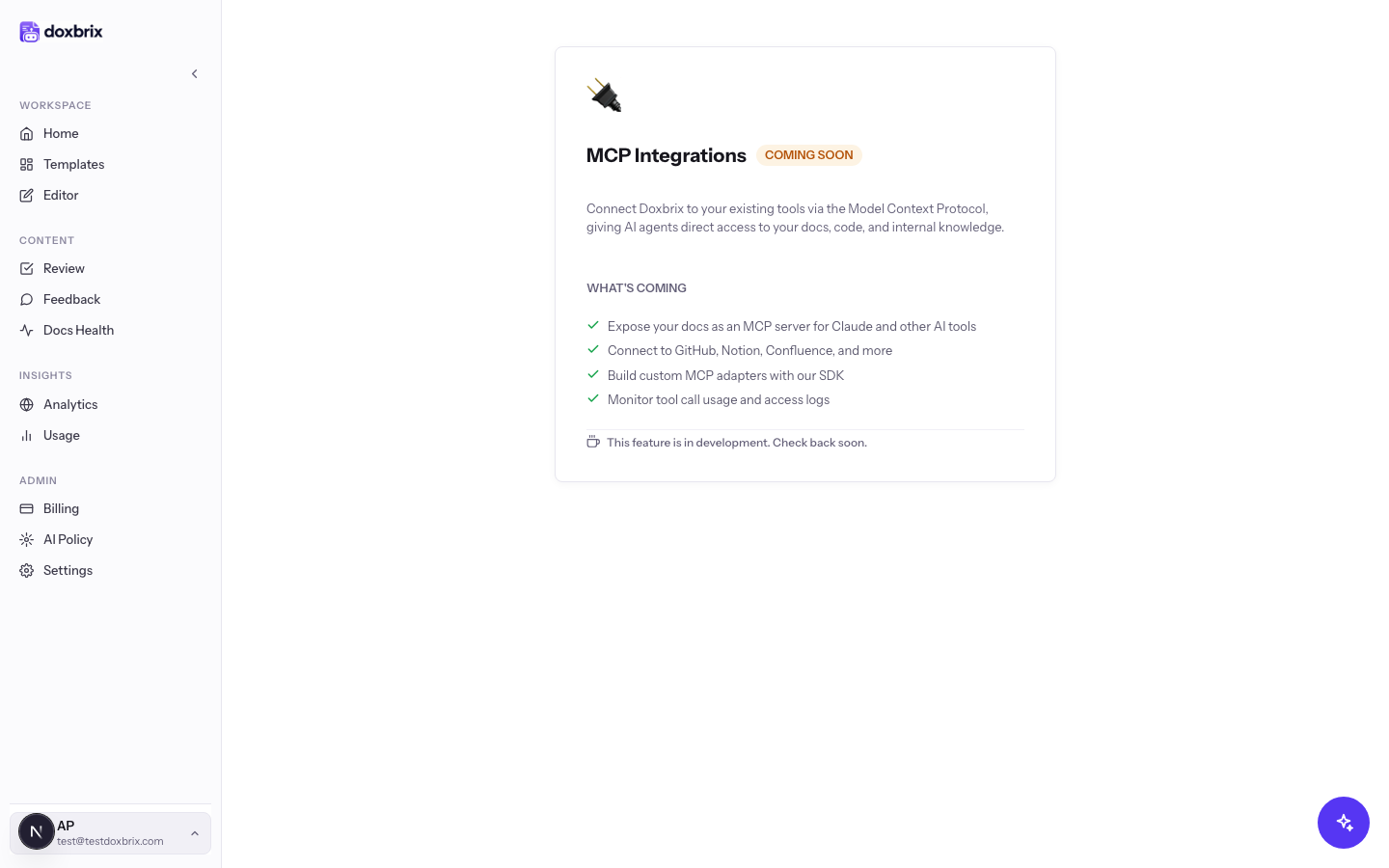
In the app sidebar, open /mcp. The MCP Integrations screen is labeled COMING SOON and says "This feature is in development." The in-app integration is not available yet, so you connect your client to the MCP server directly with the steps below.
Create a token for the agent, for example named claude-code laptop, with the scopes from the table above. Copy the dxb_… value when it is shown; it is displayed only once. For the full procedure, see Create and revoke access tokens.
Store the token in an environment variable so it never appears in a committed file:
export DOXBRIX_TOKEN="dxb_your_token_here"Use the MCP endpoint URL that your Doxbrix administrator gives you. The server's own documentation uses this hosted example:
https://mcp.doxbrix.io/mcpIf your organization runs its own instance, the URL is that host followed by /mcp, for example http://localhost:8770/mcp for a server running on your machine. See Run your own server.
Add a server entry with the URL, the project slug, and the token header. This example binds the acme-docs project and keeps the token in the environment:
{
  "mcpServers": {
    "doxbrix": {
      "url": "https://mcp.doxbrix.io/mcp?project=acme-docs",
      "headers": { "Authorization": "Bearer ${DOXBRIX_TOKEN}" }
    }
  }
}
Commit this file with the repository, for example as .mcp.json, so every contributor's agent connects to the same project. Each person supplies their own token through DOXBRIX_TOKEN. Check your client's documentation for where it reads MCP server configuration and whether it expands environment variables in headers.
Leave the URL without mode to use local mode. To let the agent edit the live project, add mode=cloud:
https://mcp.doxbrix.io/mcp?project=acme-docs&mode=cloudcreate_page, update_page, and structure tools change the live project immediately. New pages are created as drafts, but update_page replaces the body of an existing page. Use a token with only the scopes the agent needs.Restart or reload the MCP client so it reads the new configuration. Then ask the agent:
Use the doxbrix server to list my projects and show the structure of acme-docs.The agent calls list_projects and get_structure and returns your projects and the spaces and navigation of acme-docs.
doxbrix server as connected and list_projects returns the projects your account can access.Work with the agent
In local mode, a typical session looks like this:
- The agent reads
doxbrix://local-authoringanddoxbrix://componentsto learn the workflow and the real block catalog. - It drafts or edits
.mdxfiles in your repository and runsvalidate_mdxto check components and quality before you review the change. - You review the diff and run
dxb pushwhen you are ready. For the local workflow, see Tutorial: author docs locally with dxb.
Example requests:
Draft a how-to guide for rotating API keys in docs/guides/rotate-keys.mdx. Validate it before you finish.Run quality_check on acme-docs and list the five lowest-scoring pages with the main issue on each.Tools
These tools are available in every mode:
| Tool | What it does |
|---|---|
list_projects | Lists the projects the token's user can access. |
list_components | Summarizes every Doxbrix block. Accepts an optional category. |
get_component | Returns the schema, props, and an example for one block, by type or MDX tag. |
list_pages | Lists pages in a project, optionally filtered by status. |
get_page | Returns one page, with its content blocks when content is true. |
search_docs | Runs full-text and semantic search across a project. |
validate_mdx | Parses a Markdown or MDX draft, flags unknown components, and scores quality from 0 to 100. It has no side effects. |
quality_check | Returns quality scores for every saved page in a project. |
ask_ai | Asks the project's AI assistant a question, answered from its published docs with citations. |
get_settings | Reads project basics: name, description, visibility, theme, brand color, font, and reader layout. |
get_structure | Returns the navigation tree with the IDs that rename and move tools need. |
These tools are added in cloud mode only:
| Tool | What it does |
|---|---|
create_space | Creates a top-level space. |
create_page | Creates a draft page from Markdown or MDX. Pass spaceId, or spaceName to reuse or create a space. |
update_page | Replaces a page body with new Markdown or MDX. |
publish_page | Publishes a draft, or submits it for review when the project requires approval. Refused unless DOXBRIX_ALLOW_PUBLISH is on. |
update_settings | Updates only the project basics you pass. Requires a project:admin token. |
rename_item | Renames a page or section in the navigation. Renaming a page also updates its title. |
move_item | Reorders or reparents a navigation item with position and parentId. |
rename_space | Renames a space. |
move_space | Moves a space to a new zero-based position. |
Resources
| URI | Contents |
|---|---|
doxbrix://components | The block catalog with props, guidance, and examples, as JSON |
doxbrix://style-guide | House writing conventions and the quality rubric, as Markdown |
doxbrix://local-authoring | The local-first authoring workflow, as Markdown |
doxbrix://templates | Starter page shapes (how-to guide, API reference, concept, changelog) and the blocks they use |
doxbrix://projects/{project}/structure | Spaces and their pages for a project |
doxbrix://pages/{pageId} | A single page with its content |
Prompts
| Prompt | Arguments | Purpose |
|---|---|---|
document-api-endpoint | method, path, optional summary | Drafts an API reference page for one endpoint with <ApiEndpoint> |
write-how-to-guide | topic, optional audience | Drafts a task guide with <Steps> and <Tabs> |
audit-and-fix-page | pageId | Scores an existing page and improves it to pass the quality bar |
migrate-readme | readme, optional title | Converts a README into a structured Doxbrix page |
Run your own server
Organizations that run their own instance of the Doxbrix MCP server configure it with environment variables. Per-connection URL parameters override the server defaults.
| Variable | Default | Effect |
|---|---|---|
DOXBRIX_API_URL | http://localhost:3000 | Doxbrix API origin the server calls, for example https://app.doxbrix.com |
DOXBRIX_TOKEN | none | Fallback token used when a request has no Authorization header |
DOXBRIX_PROJECT | none | Default project when a tool omits project; ?project= overrides it |
DOXBRIX_MODE | local | local or cloud; ?mode= overrides it |
DOXBRIX_ALLOW_PUBLISH | off | Set to 1, true, yes, or on to allow publish_page |
PORT or MCP_PORT | 8770 | HTTP port |
DOXBRIX_API_URL=https://app.doxbrix.com \
DOXBRIX_MODE=local \
MCP_PORT=8770 \
node dist/server.js
Check that it is running:
curl http://localhost:8770/health{ "ok": true, "name": "doxbrix-mcp", "version": "0.1.0", "apiUrl": "https://app.doxbrix.com", "sessions": 0 }DOXBRIX_TOKEN on a shared server lets any client without its own token act as that token's user. Leave it unset on a server that more than one person uses.Troubleshooting
For more errors, see Troubleshoot the CLI, Git sync and MCP.